
Concrete mix design software is a digital tool that helps ready-mix producers and concrete engineers design, optimize, and manage concrete mixtures. Instead of running ACI 211.1-91 calculations by hand or juggling spreadsheets, you enter your project’s target strength, exposure conditions, and available materials, and the software returns proportioned recipes, cost analysis, and compliance documentation.
The best platforms go further. AI-driven systems learn from your historical mix performance data, flag underperforming recipes, and recommend adjustments to reduce cement content without sacrificing strength. That shift matters: cement is the most expensive and most carbon-intensive ingredient in your mix. Every kilogram you can safely remove is money and CO₂ saved.
What Is Concrete Mix Design Software?
Concrete mix design software is the category of digital tools that replaces spreadsheet-based mix design with a structured, repeatable workflow. Ready-mix producers, concrete engineers, and QC managers use it to proportion new mixes, track how existing mixes perform across projects, and generate the submittal documentation engineers and owners require.
At a basic level, the software walks you through the ACI 211.1-91 process (or your regional equivalent, such as CSA A23.1 in Canada or EN 206 in Europe) and returns the ingredients and proportions needed to hit a target strength, slump, and durability. At a more advanced level, it becomes your operational backbone: every mix your plant produces feeds performance data back into the system, so decisions on next month’s mixes are informed by last month’s actual results.
For a full primer on the fundamentals underneath the software, see our concrete mix design guide.
How AI-Driven Mix Design Differs from Manual Methods
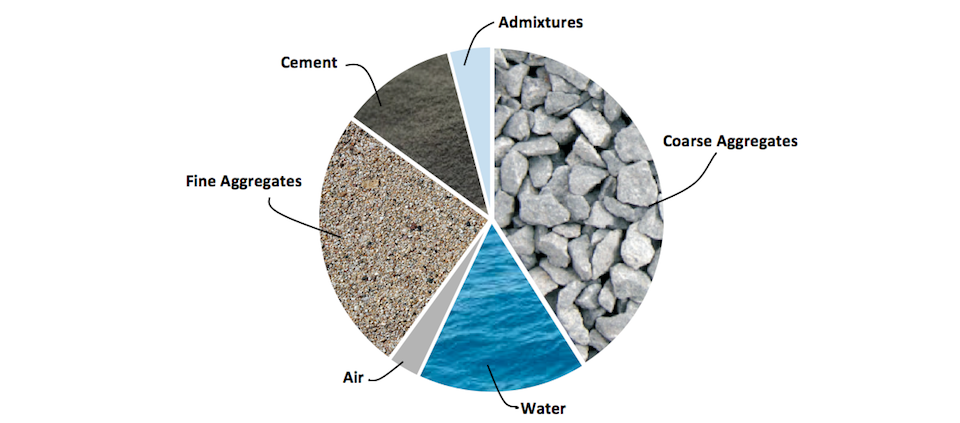
Manual mix design (whether by spreadsheet, hand calculation, or standalone calculator) treats every mix as a fresh problem. You look up the ACI table for your slump and aggregate size, calculate the water-cement ratio for your strength target, work out proportions, batch a trial, break some cylinders, and adjust. If you are a large producer running dozens of active mix designs, that process happens in parallel across mixes, projects, and plants, and the institutional memory of what worked and what did not lives in someone’s head or an aging spreadsheet.
AI-driven concrete mix design software changes the input. Instead of starting fresh, the system starts with your production history. It knows which cement source pairs badly with which admixture at what temperature. It knows which mix designs have consistently over-designed cement content by a given percentage and which underperform in cold weather. When you set up a new mix for a project, the software uses that history to predict performance and recommend adjustments, reducing overdesign, cutting cement waste, and flagging risks before you batch a trial.
Giatec SmartMix™ is one platform in this category. It combines mix design workflows with historical performance analytics and the Roxi™ AI assistant, which recommends specific mix adjustments based on your plant’s actual data. Learn more about how concrete AI is used for mix optimization.
What Concrete Mix Design Software Automates
Behind the interface, concrete mix design software automates the standard ACI 211.1-91 workflow. Here is what it handles for you:
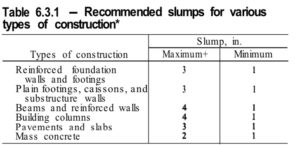
- Slump and workability specification. You define the target slump range for your project’s placement conditions; the software references ACI Table 6.3.1 automatically.
*The Help guideline is based on Table 6.3.1 (Table A1.5.3.1) of the ACI standard.
Source: Standard Practice for Selecting Proportions for Normal, Heavyweight, and Mass Concrete (ACI 211.1-91)
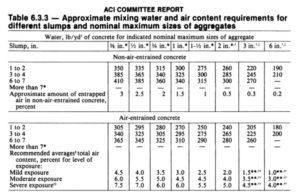
- Aggregate size selection. You enter the coarse aggregate maximum size (limited by structural cross-section and reinforcement); the software applies the ACI Table 6.3.3 constraints and calculates water demand.
*The Help icon available on this page proposes different aggregate sizes based on the limitation of Tables 6.3.3 (A1.5.3.3)
Source: Standard Practice for Selecting Proportions for Normal, Heavyweight, and Mass Concrete (ACI 211.1-91) - Mixing water and air content. The software estimates water demand and required air content (entrained or non-entrained) based on slump and aggregate size.
 Source: Standard Practice for Selecting Proportions for Normal, Heavyweight, and Mass Concrete (ACI 211.1-91)
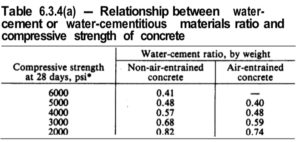
 - Water/cement ratio and strength. You enter the required compressive strength and the software returns the water/cement ratio per ACI Table 6.3.4(a), cross-checks it against the maximum ratio for the exposure condition (Table 6.3.4(b)), and calculates cement quantity.

Fly Ash. Photo Credit: IndiaMart - Pozzolanic material substitution. If you are substituting fly ash, silica fume, or slag for a portion of cement, the software adjusts water/cementitious ratio and cement weight based on the pozzolan’s specific gravity.
 Source: Standard Practice for Selecting Proportions for Normal, Heavyweight, and Mass Concrete (ACI 211.1-91)
 - Coarse aggregate volume. You define the unit weight of coarse aggregate and fineness modulus; the software returns the oven-dry-rodded coarse aggregate quantity per ACI Table 6.3.6.
 Source: Standard Practice for Selecting Proportions for Normal, Heavyweight, and Mass Concrete (ACI 211.1-91)
 - Fine aggregate calculation. The software calculates fine aggregate either by absolute volume or by concrete weight (per ACI Table 6.3.7.1), depending on your preference.
- Moisture adjustment and chemical admixtures. The software adjusts water quantity for aggregate moisture content and absorption, and lets you incorporate water reducers or air-entraining admixtures
 Source: Standard Practice for Selecting Proportions for Normal, Heavyweight, and Mass Concrete (ACI 211.1-91)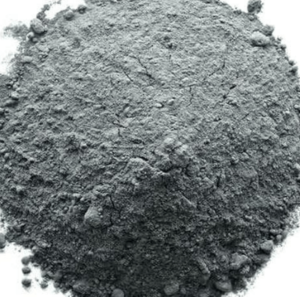
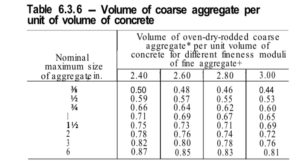 Source: Standard Practice for Selecting Proportions for Normal, Heavyweight, and Mass Concrete (ACI 211.1-91)
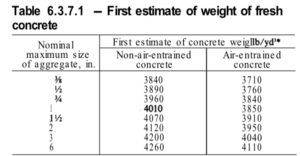 Source: Standard Practice for Selecting Proportions for Normal, Heavyweight, and Mass Concrete (ACI 211.1-91)
What to Look for in Concrete Mix Design Software
Every producer’s operation is different, but the platforms worth evaluating share a common feature set. Standards compliance: support for ACI 211.1-91 at minimum, ideally with CSA A23.1 and EN 206 depending on where you operate.
- AI-driven optimization and performance prediction. The system should learn from your production history and recommend adjustments, not just calculate proportions from a table.
- Historical mix performance tracking. Every batch, every strength result, every temperature curve searchable and comparable.
- Integration with your batch plant, dispatch, and QC systems. Data flows in from the plant and out to dispatch, without manual re-entry.
- Submittal generation. Engineer-ready and owner-ready submittals produced in minutes, not days.
- Multi-user access. QC, sales, dispatch, and management working from the same source of truth.
- Mobile and cloud availability. Access from the plant floor, the jobsite, and the truck cab.
SmartMix concrete quality control software is built around this checklist, with the Roxi™ AI assistant handling optimization recommendations and a submittal engine that keeps engineers, producers, and owners aligned. See how concrete quality control benefits from an integrated software approach, and how concrete production automation reshapes ready-mix operations.
Is There Free Concrete Mix Design Software?
Yes. For individual mix design calculations, free options exist, and Giatec’s own Concrete Hub app is one of them.
Giatec’s Concrete Hub App
Concrete Hub is a free mobile app (iOS and Android) built around the ACI 211.1-91 standard. No need to have the standard on hand: the app provides all the guidelines and performs the calculations for you, in either SI or Imperial units. It is designed to offer a beautifully categorized collection of the latest construction industry updates, useful concrete tools (such as concrete calculator), a smart dictionary, standards and guidelines, and educational materials and videos for Civil Engineering professionals, academics, researchers, and students.
You can download it for free on Android and iOS smartphones and tablets:
Android: https://play.google.com/store/apps/details?id=com.giatec.concretehub
iOS: https://apps.apple.com/ca/app/concrete-hub/id6472210075
Frequently Asked Questions
What is concrete mix design software?
Concrete mix design software is a digital tool that automates the calculation of concrete mix proportions based on target strength, durability, and workability. It replaces manual ACI 211.1-91 spreadsheet workflows and lets ready-mix producers design, track, and optimize mixes across projects.
How does AI optimize concrete mix design?
AI-driven mix design software analyzes historical mix performance data (actual strength results, temperature curves, slump measurements) and recommends proportion adjustments that reduce cement content while meeting spec. Over time, the model learns which mixes underperform in your specific plant conditions and prevents you from repeating those combinations.
Is there free concrete mix design software?
Yes. Giatec’s Concrete Hub app is a free mobile tool that walks you through ACI 211.1-91 proportioning step by step and generates a summary report. It is suited for individual calculations. For ready-mix producers managing multiple mix designs, QC data, and submittals across projects, a paid platform like Giatec® SmartMix™ handles the fleet-level workload the free tool does not.
How much does concrete mix design software cost?
Pricing depends on the platform and your operation’s scale. Free tools like the Concrete Hub app cover one-off calculations at no cost. Enterprise platforms are typically priced by plant, user, or volume.
*Editor’s Note: This post was originally published in May 2018. It has been updated for accuracy and comprehensiveness on July 2026.