


Dispatch integration is the process of linking your dispatch management platform with other key systems, like ERP, TMS, and telematics solutions, to enable seamless data flow across your logistics operations. In practice, it means orders, deliveries, vehicle locations, and status updates are shared automatically between systems without manual re-entry.
In this blog, let’s outline the core systems, step-by-step implementation, common mistakes, exception handling, key data flows, and how smart sensors support better decisions.
What Is Dispatch Integration (and Why Does It Matter)?
Dispatch integration refers to connecting your dispatch or delivery management software with other enterprise systems, so they function as one unified workflow. Dispatch handles day-to-day execution; ERP manages orders and billing; TMS plans shipments; telematics tracks vehicles. Integration ensures these systems “talk” to each other, syncing key data like order status, load assignments, and delivery confirmations. This eliminates data silos and manual entry, reducing errors and delays.

It also gives managers a live view of deliveries, improves coordination, and accelerates billing by syncing proof of delivery back to ERP. Finance benefits too; costs like fuel or labor are captured automatically.
Overall, dispatch integration enables faster, smarter decisions by turning fragmented processes into a seamless, continuous flow. Customers get better updates, teams stay aligned, and the business runs more efficiently. In the next section, we’ll explore the core systems and technologies involved in making this work.
Key Technologies Involved in Dispatch Integration
Successful dispatch integration brings together several technologies and systems, each playing a role in the overall solution. Below are the primary components and how they contribute:
- Dispatch Management System: Dispatch software assigns loads, schedules stops, and tracks deliveries. It automates routing and proof of delivery using real-time data. Integrated systems sync orders in and push status updates out without manual steps.
- Transportation Management System (TMS): A TMS plans transportation: choosing carriers, building routes, and managing loads. While dispatch may be part of a TMS, many use separate last-mile tools. Integration ensures upstream plans flow into execution, and real-time updates like reroutes sync back for visibility. It connects strategic planning with on-the-ground delivery operations.
- Enterprise Resource Planning (ERP) System: ERP systems manage orders, inventory, billing, and customer data. Integration with dispatch allows order details to sync for scheduling and, in return, updates like delivery status and charges flow back. This keeps customer service and finance aligned, eliminates manual entry, and ensures accurate, up-to-date information across the organization.
- Telematics and Fleet Tracking: Telematics systems, such as GPS, engine, or trailer sensors, stream data on vehicle location, speed, and condition. Integrated with dispatch and TMS platforms, they enable real-time tracking, ETA updates, and alerts for issues, such as traffic or equipment failure. These systems act as the fleet’s “eyes and ears,” feeding data into workflows for faster exception handling and smarter delivery decisions.
- APIs and Integration Middleware: APIs and integration platforms (iPaaS) are the core enablers of dispatch integration, allowing systems like ERP, TMS, and telematics to exchange data securely and automatically. APIs support real-time workflows such as dispatch pulling ERP orders or receiving telematics alerts, while older methods like EDI (Electronic Data Interchange) support batch updates. A well-designed integration architecture ensures scalable, secure data flow, replacing manual entry with automated, synchronized system updates.
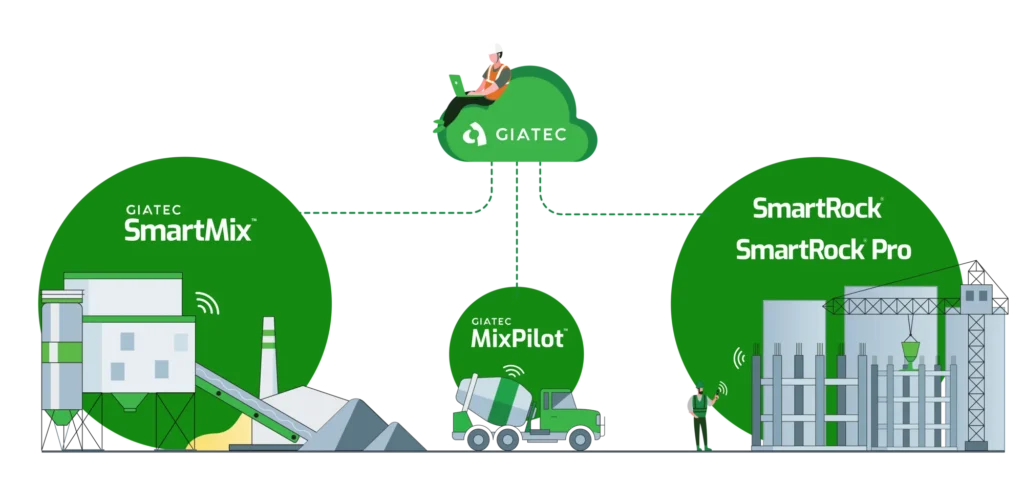
- Smart Sensors and IoT Devices: IoT sensors on cargo and equipment capture real-time data like temperature, humidity, and location during transit. Integrated with dispatch, this data helps monitor shipment conditions and trigger alerts. For example, for concrete delivery, Giatec SmartMix™ uses AI to predict mix performance before dispatch, while Giatec MixPilot™ monitors slump and temperature enroute. If thresholds are breached, dispatchers can reroute or adjust schedules to protect quality. These tools turn loads into “smart” assets, enabling proactive decisions that boost reliability, reduce waste, and maintain QC in transit. This turns shipments into “smart” assets, enabling proactive decisions like rerouting, quality control, or preventive maintenance, boosting efficiency and reducing risk in delivery operations.
Need construction scheduling strategies? Learn more here!
Step-by-Step Implementation Guide
Integrating a dispatch platform with ERP, TMS, and other systems is a project that requires careful planning and execution. Below is a step-by-step guide that mid- to senior-level logistics and IT professionals can use to approach dispatch integration systematically. Each step includes practical tips and considerations to ensure a smooth implementation.
Step 1: Map Your Processes and Workflows
Start by mapping your current dispatch and delivery process before introducing any technology. Document how orders move from customer request to fulfillment, how dispatchers plan and assign loads, and how updates reach customer service or billing. Identify manual tasks, duplicate entries, and data gaps. The goal is to visualize what needs integration and in what order.
Focus on mapping business workflows, not just systems. Outline key processes like order-to-cash and flag pain points where a lack of integration creates friction, such as canceled orders or customer changes. If drivers call in delays that are manually relayed, that’s a clear integration opportunity.
Include voices from dispatch, IT, billing, and customer service. Capture “as-is” workflows, then define “to-be” flows post-integration. A solid understanding of data flow and exceptions is essential before building anything.
Step 2: Design the Integration Architecture
With your process flows defined, the next step is to design the integration architecture—how your systems will connect and exchange data. Key decisions include whether to use direct API calls, middleware (like iPaaS), message queues, webhooks, or a combination. The architecture you choose must be scalable, resilient, and easy to maintain, not just a short-term patch.
A common mistake is relying on multiple point-to-point integrations between systems (e.g., dispatch calling ERP and TMS separately). This quickly becomes unmanageable as complexity grows. Instead, consider a hub-and-spoke model or centralized middleware that handles data routing and translation. This reduces the number of connections and simplifies future changes. Experts recommend treating integration as a long-term product investment, not just an IT task, designed to evolve as your needs do.
Plan your data flow patterns carefully. Some information, like order assignments, may require real-time updates via webhooks, while others, like billing data, can sync in scheduled batches. Decide which flows are one-way and which are bidirectional; for example, should dispatch send status updates to ERP only, or also receive order changes in return?
Error handling and monitoring are essential. Build in logging, alerts, and retry logic so that failed updates don’t go unnoticed. Silent errors erode trust and create downstream confusion.
Lastly, estimate your peak data volume. Your architecture must handle spikes, whether seasonal or scaling over time. Design for growth and stress-test accordingly.
Step 3: Model and Map Your Data
Data modeling is a critical phase in any integration project. This is where you define which data will move between systems, how it’s structured, and how fields in one system align with another. Essentially, you’re creating a common language that allows dispatch, ERP, TMS, and telematics systems to understand each other. Start by identifying the key data entities to integrate: orders, loads, status updates, proof of delivery, costs, driver records, and so on. Then, outline the fields needed and any formatting or conversion rules.
For instance, an ERP may store “Order” data with fields like customer ID, delivery address, and line items, while the dispatch system may use “Job” or “Ticket” and need fields for time windows, driver, and route. These must be carefully mapped. A “customer ID” in one system may be labeled “client code” in another. Documenting these field relationships, including status codes and trigger events is vital.
Aligning master data is equally important. Systems often use different codes for products, locations, or customers. Without harmonization, integration will fail. Establish a single source of truth where needed, typically the ERP for customer addresses or SKUs, and ensure consistency across systems to avoid downstream errors.
Also, consider data volume, retention policies, and governance. Decide what history to sync, how long to store data, and who has access. Plan for privacy and regulatory compliance from the start.
Step 3 creates the data blueprint: what flows, how it’s structured, and when it moves. Clear mapping reduces confusion during development and testing. It’s also a chance to clean up data and set standards that keep your integration stable long-term.
Master your construction cost control! Check out our strategies on how to forecast your costs.
Step 4: Develop and Connect the Systems
With your architecture and data mappings in place, Step 4 is about building the integration itself. This is where technical implementation begins: configuring systems, setting up connectors, and writing the workflows or code that connect your ERP, TMS, dispatch, and telematics platforms.
- Enable APIs and Connectors: Work with IT and software vendors to ensure secure API access. You may need to generate API tokens, configure service accounts, or install agents. If using an iPaaS, connect each system via prebuilt connectors; many dispatch and TMS tools support popular ERPs like SAP or Oracle via EDI or REST APIs. Prebuilt options can speed up this stage significantly.
- Develop Integration Workflows or Scripts: Use your mappings from Step 3 to create automation flows. For example, trigger “Order Created in ERP → Send to Dispatch.” Build status updates to flow back as well, such as “Dispatch marks delivered → ERP updates status and triggers invoice.” Each workflow should include logic for success and failure, with retries or queueing for downtime.
- Implement Exception Handling & Alerts: Add robust error-handling early. Set up alerts for failed syncs, API rate limits, or mapping errors. Many platforms include dashboards showing sync status, last run times, and errors. Also, design integrations to be idempotent: safe to retry without duplication.
- Configure Systems for Integration: Small adjustments make a big difference. Enable “integration mode” in dispatch or allow external IDs. In ERP, add custom fields for actual delivery time or linked PODs. Always use least-privilege access for safety.
Start with a focused pilot: sync a few order fields first to validate assumptions. This uncovers quirks like mismatched formats or unexpected errors, without overwhelming the team. Expand once the basics are proven.
Expect debugging; it’s part of the process. Work closely with vendors and document any deviations from the specs. By the end of this step, your core connections should be live in a test environment and ready for rigorous testing.
Protect your construction data! Learn more about amping up your cybersecurity here.
Step 5: Test Thoroughly with Real-World Scenarios
Testing is a critical step in any integration project. Once development is complete, you must validate that everything works not only under ideal conditions but also in real-world, high-pressure scenarios. A common mistake is stopping at minimal testing, just a few records, and assuming the system is ready. Instead, plan for a comprehensive testing phase that covers both routine and edge cases.
Start with unit testing individual data flows. For example, send a single order from ERP to dispatch and verify that all fields map correctly; no formatting issues, truncations, or missing data. Then, simulate marking that order as delivered in dispatch and confirm that the ERP reflects the change properly. Test variations, like orders with multiple line items or different priorities, to catch potential edge cases in basic logic.
Follow with end-to-end integration testing. Use actual or near-real data to simulate full workflows: cancellations after dispatch, mid-delivery updates, and failure scenarios like lost connectivity. Intentionally break things: disconnect systems, send malformed data, exceed API limits, and see how the system reacts. Does your alerting and retry logic activate? This ensures you’re not just testing success paths but also failure resilience.
Conduct performance and load testing to mimic real operational volume. Push thousands of transactions through the system or simulate peak periods like end-of-day processing. Does your architecture hold up under pressure? Are bottlenecks or slowdowns visible? These tests will expose whether scaling tweaks, like batching, load balancing, or system resource upgrades, are needed.
Lastly, include user acceptance testing (UAT). Let dispatchers, customer service, and billing teams test real scenarios. They’ll catch usability issues developers might miss and help build trust in the integration. Track issues, iterate, and confirm all critical paths work before rollout.
By the end of testing, your system should be stable, scalable, and ready for live deployment.
Step 6: Roll Out in Phases and Monitor Closely
When moving to production, a phased rollout is strongly recommended. Don’t switch everything over at once; instead, start with a focused pilot. For example, begin with one region, a product line, or a small team of dispatchers. This allows you to compare new and old processes side-by-side. As PCS Software advises, pilot programs reduce risk and offer more control if issues arise. Small-scale launches also help you fine-tune the setup before full deployment.
During the pilot, monitor activity closely. Use logs and dashboards to check for data errors or sync delays. Gather feedback daily from users: what’s working, what’s not? Real-world use will surface small gaps that are easier to fix now than later.
If the pilot succeeds, expand gradually. Scale by team, geography, or business unit. Train as you grow; early users can mentor new ones.
Keep a fallback plan. Run the legacy process in parallel, at least for key workflows, to ensure no data is lost. Document contingencies and track KPIs to demonstrate early success and reinforce integration value.
Step 7: Train Users and Drive Adoption
No integration succeeds without people who know how to use it. That’s why training and change management are critical to dispatch integration success. Even with perfectly connected systems, your staff must understand new workflows, interfaces, and exception-handling procedures. A well-executed training program ensures smoother adoption and unlocks the full operational benefits.

Start by focusing on core user groups:
- Dispatchers and Logistics Coordinators: Show them exactly what’s changed. If orders now feed automatically from ERP, train them to review and accept jobs efficiently and interpret new data like customer references or priority flags. Emphasize the importance of using accurate status codes; these trigger updates downstream. Also, cover new screens or error queues introduced with integration.
- Customer Service and Operations Teams: Train these users, often in ERP or CRM, on how to access updated delivery statuses and exceptions. Teach them what each status means and how to use that information to assist customers without unnecessary calls.
- Drivers (if applicable): If using mobile apps or ELDs, explain how their interactions now feed the system automatically. Reassure them about what hasn’t changed and who to contact for help.
- IT and Support Teams: Train your technical staff to use integration dashboards, handle errors, and apply updates. A clear support runbook can prevent downtime and confusion.
Involve users early in testing and rollout. Offer cheat sheets, walkthroughs, and online training tools when possible. Also, set clear expectations. Explain the why behind the changes and be upfront about any data limitations (e.g., sync frequency). Transparency builds trust.
Meanwhile, continue gathering feedback post-launch. Stay responsive; small tweaks can have a big impact. Treat training as an ongoing process tied to onboarding and system updates. Empowered users are your best guarantee that the integration delivers lasting value.
With these seven steps, you can implement dispatch integration methodically and successfully.
Critical Data to Synchronize in Dispatch Integration
Integrating dispatch systems with ERP, TMS, and telematics platforms requires careful attention to which data is shared and how it flows between systems. Synchronizing the right data ensures consistency, reduces manual work, and provides all departments with the information they need and when they need it. Below are the critical data types to integrate and why each matters.
- Orders and Delivery Requests: These are the starting point for every dispatch process. Orders entered into ERP or an order management system (OMS) must flow automatically into the dispatch system, complete with delivery instructions, time windows, and customer information. This avoids delays from manual entry and reduces the risk of errors. If an order is canceled or edited, that update should immediately reflect in the dispatch system to avoid wasted trips. A properly integrated system keeps order and delivery workflows aligned, ensuring the dispatcher always works with accurate, current information.
- Loads/Shipments and Route Plans: A TMS may group multiple orders into a single load or route plan. Sharing this consolidated data with the dispatch system ensures drivers follow optimized routes without manual re-entry. It’s also critical for ERP or CRM systems to track which route or shipment an order was assigned to. Attributes such as vehicle assignment, stop sequence, and total load weight must be synchronized so all systems reflect the same shipment structure.
- Delivery Status Updates: Real-time visibility into delivery progress is a major benefit of integration. Dispatchers and systems should report statuses like Dispatched, In Transit, Delayed, and Delivered back to ERP and customer portals. This keeps operations teams aligned and customers informed without extra calls. It also enables downstream automation, like triggering invoicing or inventory updates upon confirmed delivery.
- Proof of Delivery (POD) and Confirmation: When a delivery is complete, digital confirmation, such as an electronic signature, timestamp, or photo, should flow back into ERP or document repositories. This provides traceability and supports faster invoicing. If delivery confirmation is stored as a file or link, ensure that reference is passed back to systems that need it. This not only speeds up billing cycles but also helps resolve disputes more efficiently.
- Exception and Event Notifications: Not every delivery goes as planned. Canceled stops, failed attempts, unexpected delays, or re-routes must be captured and shared across systems. When telematics or dispatch tools detect an issue, such as prolonged idle time or missed time windows, integrated alerts allow customer service or operations to intervene quickly. Automating this exception handling across systems creates accountability and improves response times.
- Cost and Billing Data: Financial transparency requires that accessorial charges, like detention fees, tolls, or fuel surcharges, sync into ERP and billing systems. When dispatch or TMS systems calculate delivery costs, this data should flow back for reconciliation. Integrated costing enables better margin tracking, reduces manual entry errors, and speeds up invoicing.
- Master Data and Reference Info: Core datasets like customer profiles, location data, product SKUs (Stock Keeping Unit), and driver information must stay consistent across platforms. Keeping these aligned through batch syncs or live APIs ensures all systems speak the same language, reducing confusion and integration mismatches.
By integrating these data flows, you ensure every stakeholder, from driver to finance, is operating with a single source of truth. It creates a closed-loop system where operations, planning, and reporting all align seamlessly. Use this list as your integration checklist to cover all bases and avoid costly gaps down the line.
Common Mistakes in Dispatch Integration
Even well-planned dispatch integration projects can go off track if common pitfalls aren’t addressed early. Below are six key mistakes that often undermine success, along with how to avoid them.
1. Ignoring Data Growth
Integrated systems generate massive volumes of data, from GPS pings and status updates to delivery events and sensor readings. A common mistake is underestimating how quickly this data accumulates. Without a strategy for archiving, compressing, or summarizing it, you risk slow system performance, costly storage, and unusable historical data. For example, detailed telematics logs or proof-of-delivery images may not need to live in the main database forever. Design retention policies early and decide what needs to be stored long-term, what can be aggregated, and what can be archived after use.
2. No Strategy for Data Quality
Integrating systems doesn’t magically fix bad data. In fact, poor quality spreads faster when systems are connected. Mismatched customer IDs, inconsistent status codes, or missing reference data can lead to delivery failures, billing errors, or faulty reports. A strong integration plan includes data governance: standardizing formats, cleaning up master data, and validating inputs across systems. For example, ensuring ERP and dispatch use the same location codes or units of measure will prevent downstream issues. Clean data is foundational to automation, analytics, and trust in the system.
3. Over-Integrating Before Standardizing
Trying to connect every system and process before standardizing core workflows often leads to complex, brittle integrations. If each region or business unit uses different status values, cancellation reasons, or dispatch practices, you’ll end up encoding dozens of variations. This makes long-term maintenance difficult and increases the chance of misalignment. Instead, simplify first. Define common workflows, standard codes, and unified business rules before automating. Integrate only once the foundation is clear; otherwise, you risk locking chaos into code.
4. Missing a Long-Term Analytics Plan
Many integration efforts focus only on operational dashboards, tracking today’s loads or current ETAs. But without a long-term data model, it’s hard to analyze trends over months or years. What was the true on-time performance last quarter? Which routes consistently underperform? A missed opportunity is failing to design for analytics from the start. Build data pipelines that feed into BI tools or data lakes and preserve context like delivery conditions, exceptions, and costs. Over time, this historical data becomes fuel for forecasting, optimization, and strategic decisions.
5. Treating Telemetry as Optional
Vehicle and cargo telemetry, like GPS location, temperature, or engine data, is sometimes treated as a bonus rather than a core input. But ignoring this data leaves blind spots. For example, if your system doesn’t integrate temperature alerts from a refrigerated truck, you might miss a spoiled load. Or if GPS pings aren’t connected to dispatch, ETAs can’t be updated. Telemetry isn’t just nice to have, it’s critical for visibility, safety, and proactive service. Integrate it fully and structure it into your workflows.
6. Incomplete Exception Design
Integrations often focus on the “happy path”, orders go out, deliveries return clean. But real life involves cancellations, reroutes, delays, and failed deliveries. A mistake is not fully designing how these exceptions are detected, communicated, and resolved across systems. If a delivery is canceled, does that update every system? If a reroute happens mid-trip, is the new ETA shared with customer service? Without exception logic baked into the integration, you risk broken processes, billing disputes, and poor service. Make exception handling a first-class part of the design.
Handling Exceptions and Disruptions via Integration
In logistics, things rarely go exactly as planned. Deliveries get delayed, routes change mid-shift, orders are canceled last minute, and customers aren’t always available. A major strength of dispatch integration is its ability to improve exception management.

When systems are connected, disruptions can be detected and handled faster, with better coordination across departments. Below are common types of exceptions and how to manage them effectively through integration:
- Canceled Loads or Orders: When an order is canceled, by a customer or internally, timing is critical. If dispatch isn’t notified in time, a truck might be dispatched unnecessarily, wasting time and fuel. With integration, a cancellation recorded in ERP or CRM can instantly update the dispatch system, remove the stop or marking it for review. The driver’s mobile app can be updated in real time, avoiding wasted trips. Likewise, if a dispatcher cancels a job (due to truck breakdown or overbooking), the update should flow back to ERP and trigger customer updates or rescheduling. Ideally, automated logic can also trigger follow-up tasks, like notifying planning to reassign the order or initiating a refund.
- Delays and Schedule Changes: Delays are inevitable, whether from traffic, weather, or site issues. A telematics-integrated system can detect slow movement or idle time and predict likely delays. Updated ETAs can flow automatically from dispatch into ERP, CRM, or customer portals, keeping everyone informed. Some systems may also trigger alerts or messages to affected customers. Integrating delay reason codes (e.g., traffic, mechanical issue, customer not ready) adds value by enabling root cause analysis later. This kind of proactive communication builds trust and avoids customer frustration.
- Rerouting and Re-planning: Sometimes a driver must be rerouted mid-route due to cancellations, emergencies, or higher-priority stops. An integrated system ensures that such changes (like swapping stops B and C) update across all platforms: dispatch, ERP, TMS, and customer interfaces. ETAs, delivery addresses, and costs should adjust accordingly. IoT inputs (like breakdown alerts) can even trigger dynamic rerouting suggestions or load reassignments automatically. Even if full automation isn’t in place, integrated workflows ensure that manual decisions made by dispatchers ripple instantly through the operation.
- Delivery Exceptions (Failed Attempts, Refusals): If a delivery fails (e.g., the recipient isn’t home or refuses the item), logging that in dispatch should automatically update ERP and notify customer service. This can launch a return process, alert warehouse teams, or prompt outreach to the customer. Without integration, this handoff often relies on emails or calls, introducing delays and errors. Automated handling is especially important at scale.
- Data or System Exceptions: Not all issues are physical; some are digital. If dispatch receives a malformed address or an API call fails during sync, the issue should trigger an alert and enter a support queue. Silent failures undermine system trust. Integrations should include logic to validate data, retry failures, and escalate problems if not resolved.
Ultimately, exception management is about visibility and speed. Integrated systems create a feedback loop: events happen, alerts are shared, and responses are triggered, automatically or by the right person. Consider building an exception matrix that outlines each scenario, how it’s detected, which systems act on it, and what communications or workflows are triggered. Some organizations layer on BPM tools for added control.
Dispatch integration won’t eliminate exceptions, but it gives you the tools to handle them quickly and consistently, improving service, reducing waste, and building operational resilience.
Want to strengthen your construction management skills? Learn more here!
Leveraging Smart Sensors and IoT for Smarter Dispatch Integration
One of the most exciting frontiers in modern dispatch integration is the use of smart sensors and IoT data. By incorporating real-time information from the physical world, organizations can make faster, smarter decisions during transportation and delivery. IoT integration does not just improve tracking: it enhances quality control, reduces waste, and helps logistics teams move from reactive to predictive operations.
IoT in Fleet and Cargo
Many logistics operations already use telematics, which is essentially a form of IoT. This includes GPS trackers, electronic logging devices, and engine sensors that provide continuous data about vehicle location and performance. Beyond the vehicle, sensors are increasingly used on cargo. These may include temperature and humidity sensors in refrigerated vehicles, shock sensors for fragile goods, RFID tags for inventory, and even pressure or load sensors. When integrated with dispatch systems, this data becomes actionable. For example, if a refrigerated trailer starts to exceed safe temperature thresholds, the system can alert dispatchers before the shipment is compromised. A dispatcher may then re-route the truck to the nearest cold storage or send a technician. DHL, for example, uses IoT data to predict vehicle maintenance needs, helping avoid breakdowns. Integrated with dispatch, this enables proactive route adjustments and vehicle substitution before issues escalate.
Real-Time Decision-Making
Integrated IoT data can trigger immediate operational decisions. As noted by GeoPostcodes, in a fully connected dispatch network, live location data can adjust routes automatically, and vehicle telemetry can support proactive maintenance. This leads to fewer disruptions and more efficient delivery. The vision is a live “digital twin” of your logistics network, where the digital representation is constantly updated by sensor data from the field. When a road closure is detected, for instance, the dispatch system can replan the route and notify both the driver and the customer with updated ETAs. Without this integration, such adjustments often rely on slower human interventions.
Optimizing Mixes with AI and Real-Time Monitoring
AI and sensor technologies are transforming how concrete mix quality is managed during delivery. Predictive software can analyze historical and current batch data to recommend mix adjustments based on factors like temperature, material type, and haul time. When integrated with dispatch, these insights help plan routes, set pour schedules, or adjust mixes in advance to prevent quality issues.
On concrete trucks, in-transit systems can monitor slump and temperature in real time.
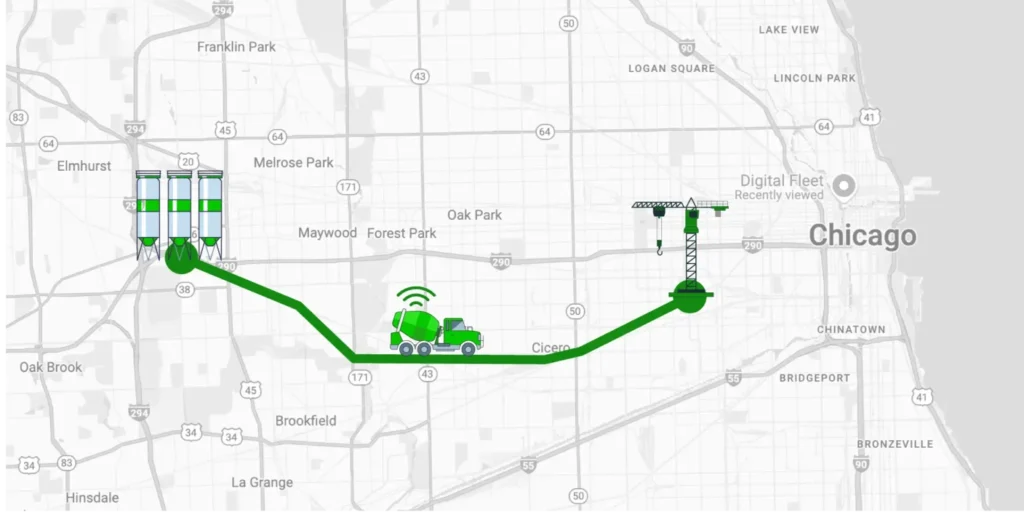
If the concrete begins to overheat or loses workability, the dispatch team can be alerted instantly and take corrective action: rerouting the truck, adjusting timing, or sending a replacement. Together, these tools ensure each load arrives within spec, reduce waste, and improve coordination between batching, quality control, and delivery.
The Value of IoT-Integrated Dispatch
The core advantage of integrating IoT into dispatch systems is closing the loop between planning and real-world conditions. Dispatch sees more than just jobs and routes; it sees shipment condition, vehicle health, and environmental risks in real time. In concrete delivery, Giatec solutions demonstrate this power by ensuring quality through sensor feedback. In general logistics, the same principle applies: when sensor data is integrated and acted upon, companies reduce risk, cut waste, and increase customer satisfaction.
As sensor costs decrease and connectivity improves through technologies like 5G and low-Earth orbit satellite networks, IoT will play an even larger role. Dispatch systems will connect not only to trucks and drivers but also to smart infrastructure, such as traffic lights, weather services, and vehicle-to-vehicle communication. Companies investing in this now are setting themselves up for leadership in predictive, intelligent logistics.
Conclusion
Dispatch integration turns dispatch into the operational hub that connects ERP, TMS, telematics, and IoT so orders, routes, vehicle status, proof of delivery, costs, and exceptions flow automatically in real time. Implemented step by step by mapping workflows, choosing a scalable architecture, standardizing data, building and testing integrations, then rolling out in phases with training, it eliminates manual entry and silos while improving visibility, billing speed, and cross-team alignment. The biggest payoff comes when exceptions such as delays, cancellations, reroutes, failed deliveries, and sync errors trigger coordinated, automated responses instead of ad-hoc workarounds.
As smart solutions, like Giatec’s SmartMix and MixPilot, add live quality and condition data, dispatch for concrete delivery evolves from task execution to decision support, helping teams act faster, reduce waste, and deliver a more reliable customer experience.
Optimize your concrete fleets! Listen to our podcast episode now.